Worksheet
Set column visibility
def set_col_visible(sheet: str, columns: str, visible: bool) -> None
Set visible of a single column by given worksheet name and column name. This function is concurrency safe. For example, hide column D in Sheet1:
f.set_col_visible("Sheet1", "D", False)
Hide the columns from D to F (included):
f.set_col_visible("Sheet1", "D", False)
Set column width
def set_col_width(sheet: str, start_col: str, end_col: str, width: float) -> None
Set the width of a single column or multiple columns.
f.set_col_width("Sheet1", "A", "H", 20)
Set row height
def set_row_height(sheet: str, row: int, height: float) -> None
Set the height of a single row. If the value of height is 0, will hide the specified row, if the value of height is -1, will unset the custom row height. For example, set the height of the first row in Sheet1:
f.set_row_height("Sheet1", 1, 50)
Set row visibility
def set_row_visible(sheet: str, row: int, visible: bool) -> None
Set visible of a single row by given worksheet name and row number. For example, hide row 2 in Sheet1:
f.set_row_visible("Sheet1", 2, False)
Get sheet name
def get_sheet_name(sheet: int) -> str
Get the sheet name of the workbook by the given sheet index. If the given sheet index is invalid, it will return an empty string.
Get column visibility
def get_col_visible(sheet: str, col: str) -> bool
Get visible of a single column by given worksheet name and column name. This function is concurrency safe. For example, get the visible state of column D in Sheet1:
visible = f.get_col_visible("Sheet1", "D")
Get column width
def get_col_width(sheet: str, col: str) -> float
Get the column width by given the worksheet name and column name.
Get row height
def get_row_height(sheet: str, row: int) -> float
Get row height by given worksheet name and row number. For example, get the height of the first row in Sheet1:
height = f.get_row_height("Sheet1", 1)
Get row visibility
def get_row_visible(sheet: str, row: int) -> bool
Get visible of a single row by given worksheet name and row number. For example, get visible state of row 2 in Sheet1:
visible = f.get_row_visible("Sheet1", 2)
Get sheet index
def get_sheet_index(sheet: str) -> int
Get a sheet index of the workbook by the given sheet name. If the given sheet name is invalid or sheet doesn't exist, it will return an integer type value -1.
The obtained index can be used as a parameter to call the set_active_sheet() function when setting the workbook default worksheet.
Get sheet map
def get_sheet_map() -> Dict[int, str]
Get worksheets, chart sheets, dialog sheets ID, and name maps of the workbook. For example:
try:
    f = excelize.open_file("Book1.xlsx")
except (RuntimeError, TypeError) as err:
    print(err)
    exit()
try:
    for index, name in f.get_sheet_map().items():
        print(index, name)
except (RuntimeError, TypeError) as err:
    print(err)
finally:
    err = f.close()
    if err:
        print(err)
Get sheet list
def get_sheet_list() -> List[str]
Get worksheets, chart sheets, and dialog sheets name list of the workbook.
Set sheet name
def set_sheet_name(source: str, target: str) -> None
Set the worksheet name by given the source and target worksheet names. Maximum 31 characters are allowed in sheet title and this function only changes the name of the sheet and will not update the sheet name in the formula or reference associated with the cell. So there may be a problem formula error or reference missing.
Insert columns
def insert_cols(sheet: str, col: str, n: int) -> None
Insert new columns before the given column name and number of columns. For example, create two columns before column C in Sheet1:
f.insert_cols("Sheet1", "C", 2)
Insert rows
def insert_rows(sheet: str, row: int, n: int) -> None
Insert new rows after the given Excel row number starting from 1 and number of rows. For example, create two rows before row 3 in Sheet1:
f.insert_rows("Sheet1", 3, 2)
Append duplicate row
def duplicate_row(sheet: str, row: int) -> None
Inserts a copy of specific row below specified, for example:
f.duplicate_row("Sheet1", 2)
Use this method with caution, which will affect changes in references such as formulas, charts, and so on. If there is any referenced value of the worksheet, it will cause a file error when you open it. The excelize only partially updates these references currently.
Duplicate row
def duplicate_row_to(sheet: str, row: int, row2: int) -> None
Inserts a copy of specified row by it Excel number to specified row position moving down exists rows after target position, for example:
f.duplicate_row_to("Sheet1", 2, 7)
Use this method with caution, which will affect changes in references such as formulas, charts, and so on. If there is any referenced value of the worksheet, it will cause a file error when you open it. The excelize only partially updates these references currently.
Create row outline
def set_row_outline_level(sheet: str, row: int, level: int) -> None
Set outline level number of a single row by given worksheet name and row number. The range of level parameter value from 1 to 7. For example, outline row 2 in Sheet1 to level 1:
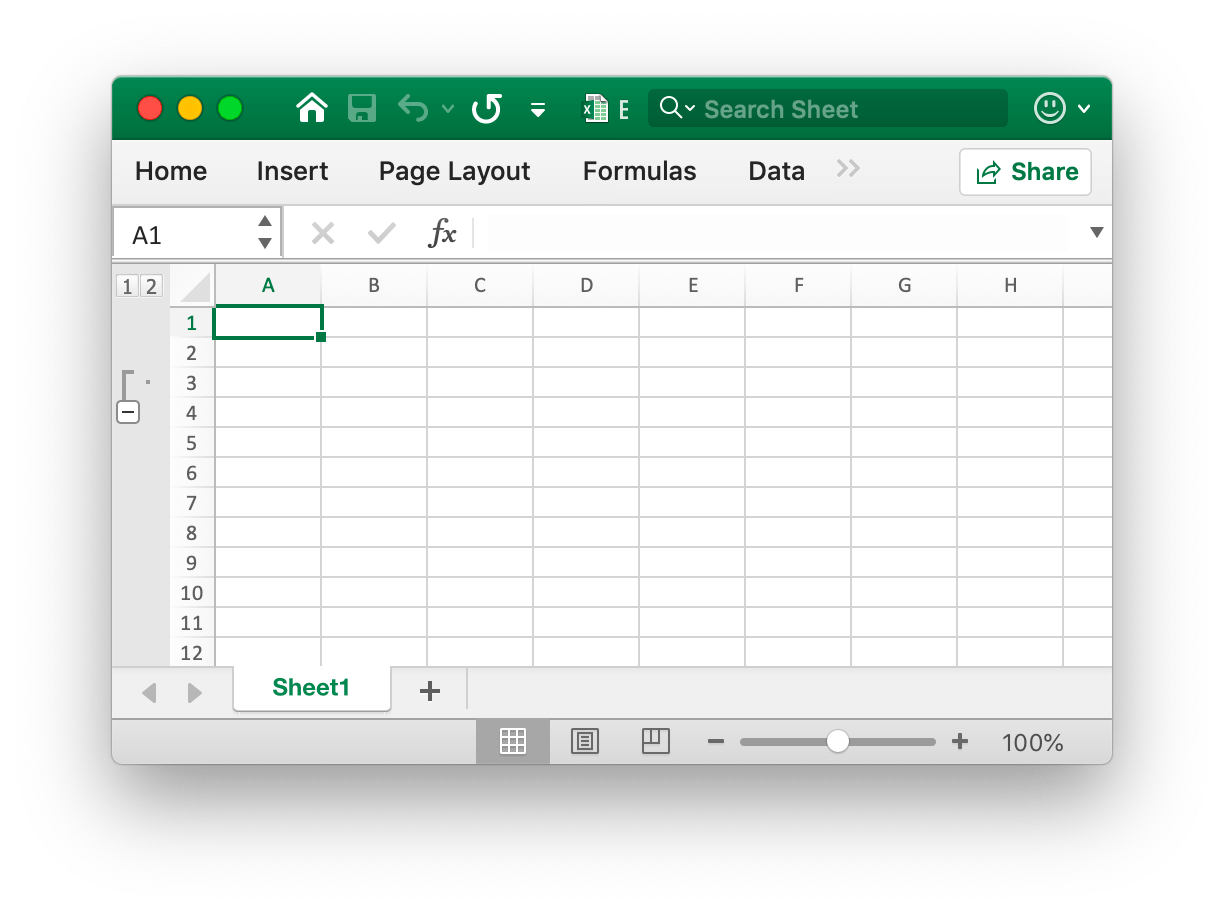
f.set_row_outline_level("Sheet1", 2, 1)
Create column outline
def set_col_outline_level(sheet: str, col: str, level: int) -> None
Set outline level of a single column by given worksheet name and column name. For example, set outline level of column D in Sheet1 to 2:
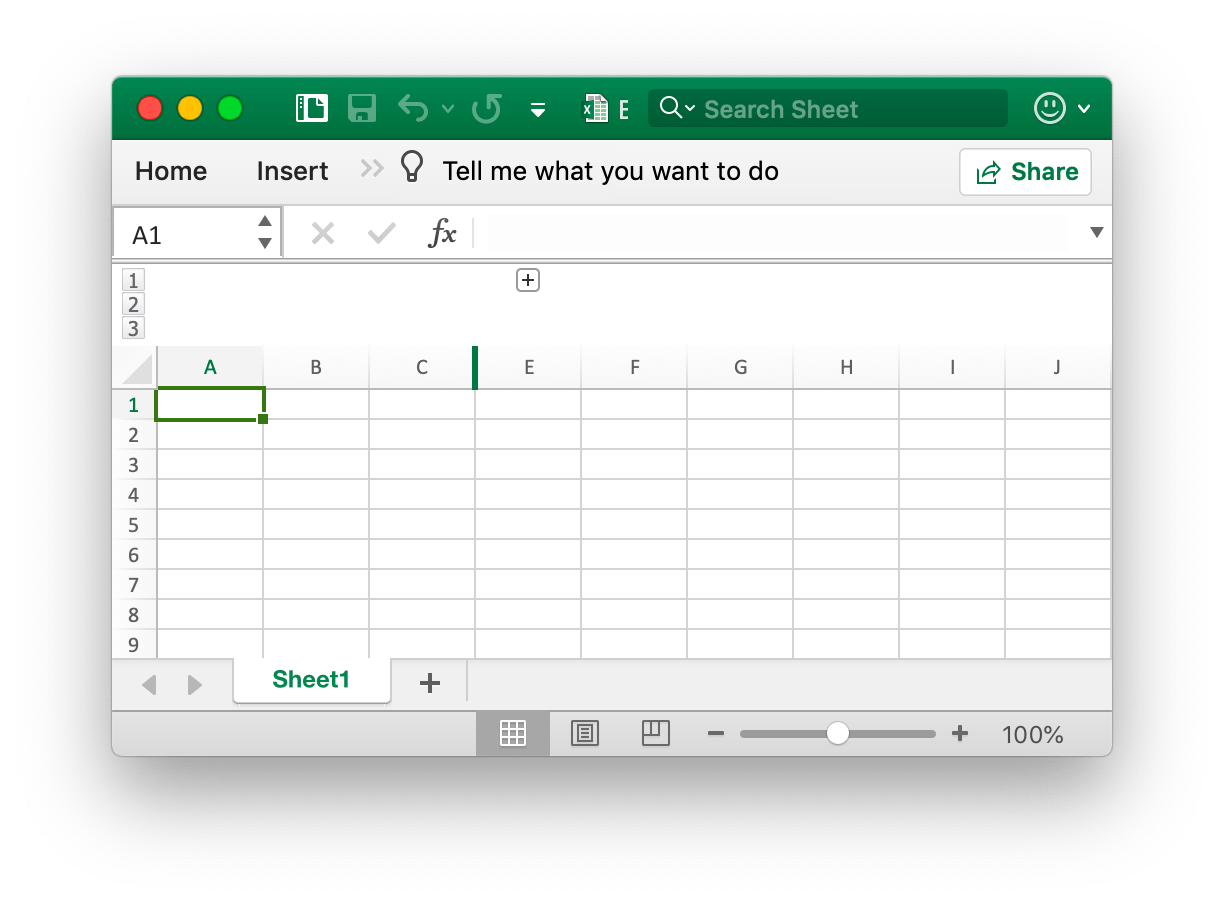
f.set_col_outline_level("Sheet1", "D", 2)
Get row outline
def get_row_outline_level(sheet: str, row: int) -> int
Get the outline level number of a single row by given worksheet name and Excel row number. For example, get the outline number of row 2 in Sheet1:
level = f.get_row_outline_level("Sheet1", 5)
Get column outline
def get_col_outline_level(sheet: str, col: str) -> int
Get the outline level of a single column by given worksheet name and column name. For example, get outline level of column D in Sheet1:
level = f.get_col_outline_level("Sheet1", "D")
Search Sheet
def search_sheet(sheet: str, value: str, *reg: bool) -> List[str]
Get cell reference by given worksheet name, cell value, and regular expression. The function doesn't support searching on the calculated result, formatted numbers and conditional lookup currently. If it is a merged cell, it will return the cell reference of the upper left cell of the merged range reference.
For example, search the cell reference of the value of 100 on Sheet1:
try:
    result = f.search_sheet("Sheet1", "100")
except (RuntimeError, TypeError) as err:
    print(err)
For example, search the cell reference where the numerical value in the range of 0-9 of Sheet1 is described:
try:
    result = f.search_sheet("Sheet1", "[0-9]", True)
except (RuntimeError, TypeError) as err:
    print(err)
Protect Sheet
def protect_sheet(sheet: str, opts: SheetProtectionOptions) -> None
Prevent other users from accidentally or deliberately changing, moving, or deleting data in a worksheet. The optional field AlgorithmName specified hash algorithm, support XOR, MD4, MD5, SHA-1, SHA-256, SHA-384, and SHA-512 currently, if no hash algorithm specified, will be using the XOR algorithm as default. For example, protect Sheet1 with protection settings:
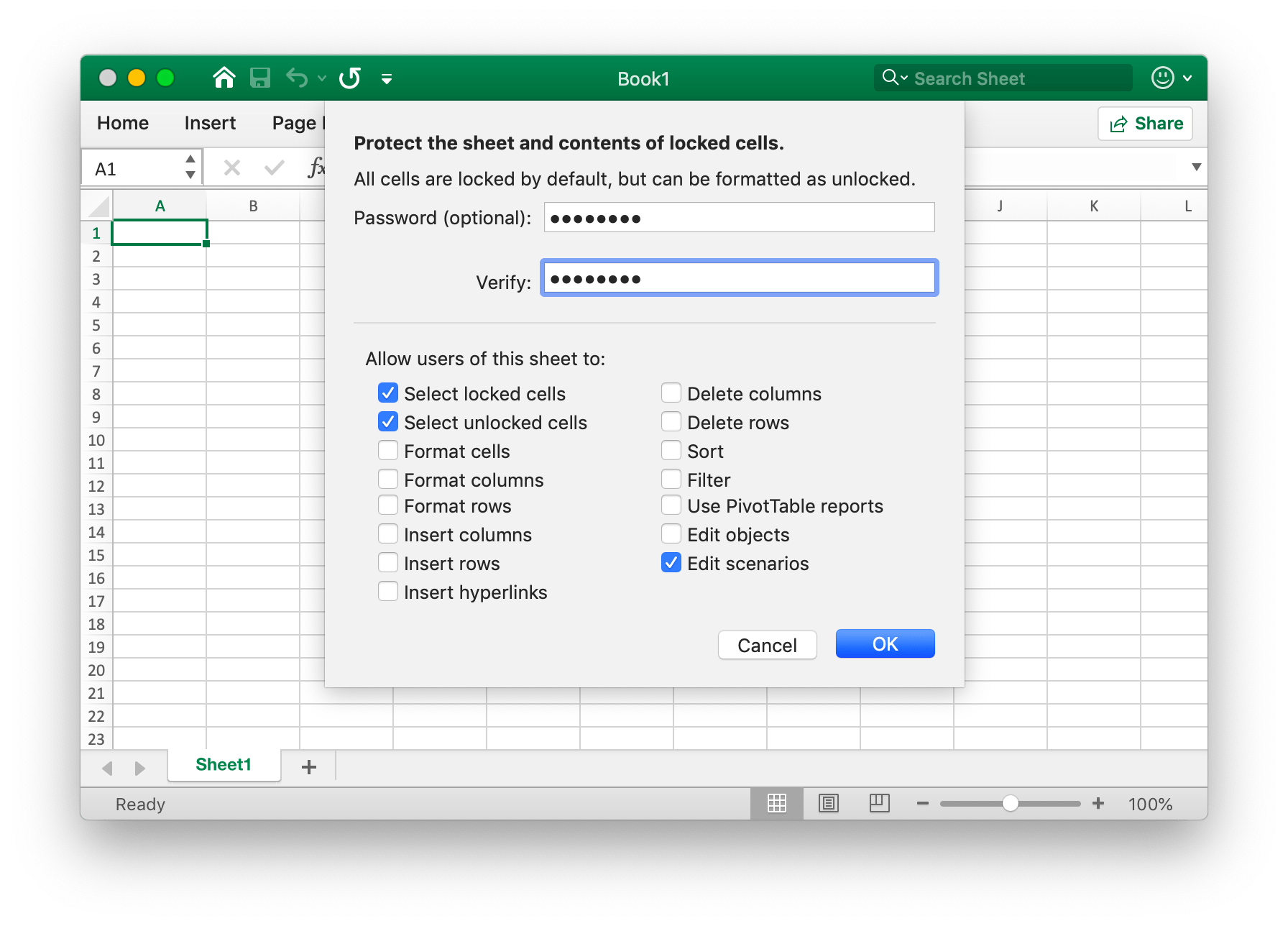
try:
    f.protect_sheet("Sheet1", excelize.SheetProtectionOptions(
        algorithm_name="SHA-512",
        password="password",
        select_locked_cells=True,
        select_unlocked_cells=True,
        edit_scenarios=True,
    ))
except (RuntimeError, TypeError) as err:
    print(err)
SheetProtectionOptions directly maps the settings of worksheet protection.
class SheetProtectionOptions:
    algorithm_name: str = ""
    auto_filter: bool = False
    delete_columns: bool = False
    delete_rows: bool = False
    edit_objects: bool = False
    edit_scenarios: bool = False
    format_cells: bool = False
    format_columns: bool = False
    format_rows: bool = False
    insert_columns: bool = False
    insert_hyperlinks: bool = False
    insert_rows: bool = False
    password: str = ""
    pivot_tables: bool = False
    select_locked_cells: bool = False
    select_unlocked_cells: bool = False
    sort: bool = False
Unprotect Sheet
def unprotect_sheet(sheet: str, *password: str) -> None
Remove protection for a sheet, specified the second optional password parameter to remove sheet protection with password verification.
Remove column
def remove_col(sheet: str, col: str) -> None
Remove a single column by given worksheet name and column index. For example, remove column C in Sheet1:
f.remove_col("Sheet1", "C")
Use this method with caution, which will affect changes in references such as formulas, charts, and so on. If there is any referenced value of the worksheet, it will cause a file error when you open it. The excelize only partially updates these references currently.
Remove row
def remove_row(sheet: str, row: int) -> None
Remove a single row by given worksheet name and Excel row number. For example, remove row 3 in Sheet1:
f.remove_row("Sheet1", 3)
Use this method with caution, which will affect changes in references such as formulas, charts, and so on. If there is any referenced value of the worksheet, it will cause a file error when you open it. The excelize only partially updates these references currently.
Set column values
def set_sheet_col(
    sheet: str,
    cell: str,
    values: List[Union[None, int, str, bool, datetime, date]],
) -> None
Writes an array to column by given worksheet name, starting cell reference and a pointer to array type slice. For example, writes an array to column B start with the cell B6 on Sheet1:
f.set_sheet_col("Sheet1", "B6", ["1", None, 2])
Set row values
def set_sheet_row(
    sheet: str,
    cell: str,
    values: List[Union[None, int, str, bool, datetime, date]],
) -> None
Writes an array to row by given worksheet name, starting cell reference and a pointer to array type slice. This function is concurrency safe. For example, writes an array to row 6 start with the cell B6 on Sheet1:
f.set_sheet_row("Sheet1", "B6", ["1", None, 2])
Insert page break
def insert_page_break( cell: str) -> None
Create a page break to determine where the printed page ends and where begins the next one by given worksheet name and cell reference, so the content before the page break will be printed on one page and after the page break on another.
Remove page break
def remove_page_break(sheet: str, cell: str) -> None
Remove a page break by given worksheet name and cell reference.
Set sheet dimension
def set_sheet_dimension(sheet: str, range_ref: str) -> None
Set or remove the used range of the worksheet by a given range reference. It specifies the row and column bounds of used cells in the worksheet. The range reference is set using the A1 reference style(e.g., A1:D5). Passing an empty range reference will remove the used range of the worksheet.
Get sheet dimension
def get_sheet_dimension(sheet: str) -> str
Get the used range of the worksheet.